
Get your free Clover® Go
card reader or $200 toward another Clover point-of-sale device when you open a new Merchant Services accountFootnote1
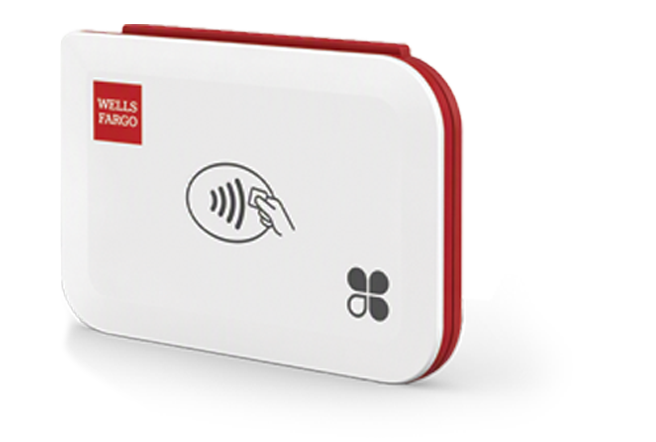
Mention promo code: LET’S GO!
Make the most of your new Wells Fargo business checking account by opening a new Merchant Services account to unlock this exclusive offer.
Get paid. Manage operations. Grow with confidence. All with one connected platform.

Accept payments your way
Securely in person, by phone, on your website, or online through a virtual payment gateway.

Accelerate cash flow
Enjoy funding as soon as the next business day when payments are deposited into your Wells Fargo business deposit account.

Manage operations
Oversee staff, track inventory, and engage customers, all with easy-to-use tools built for busy businesses.

Make informed decisions
Gain insights, identify trends, increase scalability, and stay compliant with PCI Data Security Standards.

Grow with confidence
Expand your reach and build your brand with smart tools, integrations, and improved service.

Integrate seamlessly
Join existing and new business tools to drive efficiency, engagement, and scalable growth.
From simple mobile devices to advanced point-of-sale (POS) systems, you can find flexible solutions that accept payments wherever you do business.
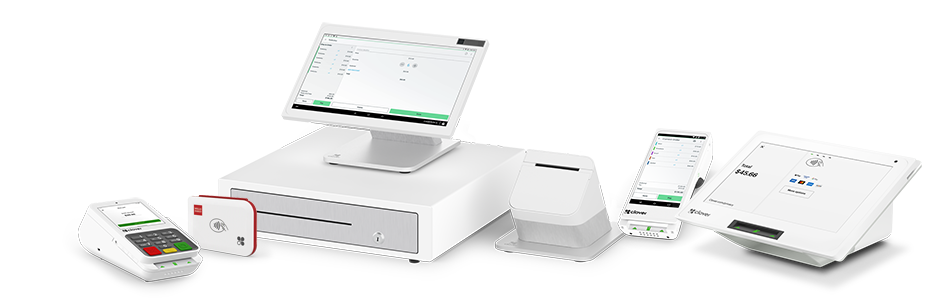
Payment solutions that can transform how you work

Restaurants
Elevate your
restaurant business
 Restaurants, Keep your restaurant running smoothly Toggle button, Click here to view overlay
Services
Scale your
service business
 Services, Set your business up for success Toggle button, Click here to view overlay
Dynamic pricing built for growth
In-person tap, dip, or swipe
2.4% to 2.6%
A fee of 15¢ applies to each transaction
Rates are adjusted automatically based on monthly processing volume.
Online or keyed-in
3.3% to 3.5%
A fee of 15¢ applies to each transaction
Rates are adjusted automatically based on monthly processing volume.
A fee of 15¢ applies to each transaction
Rates are adjusted automatically based on monthly processing volume.
Simple pricing. No surprises.
- Standard monthly fees
- No early termination fees
- No annual fee
- Cancel anytime
No fees for common services, including:
- Online statements
- Authorizations
- Address verifications
- Downgrades
- Chargebacks
- Foreign transactions
FAQs
Merchant services are financial solutions that help businesses accept and process payments. Wells Fargo provides a complete suite of tools — including hardware and software — to accept payments in person, online, or by phone. Plus, our solutions help you manage operations and uncover opportunities to grow your business.
What is a Wells Fargo merchant account and what does it include?
A merchant account makes it easy for businesses of any size to accept card payments. Once payments are processed, funds are deposited into your account and can be transferred to a business deposit account — as soon as the next business day with a business deposit account from Wells Fargo. We partner with Clover® to deliver flexible, all-in-one solutions for payment acceptance, business management, and growth.
Every account with Clover includes:
- Payment acceptance capabilities
- Basic Clover software plan features
- Access to Clover gateway for virtual payments
- Clover dashboard for visibility into business activity
- Funding as soon as the next business day with a Wells Fargo business deposit account
- 24/7 live expert support
- Real-time sales data and robust reporting
- Advanced fraud protection and dispute management tools
- Built-in payment security compliance
How can I accept the payment methods my customers prefer?
Our payment solutions are designed to give your customers flexibility — and help you never miss a sale. You can accept:
- All major credit and debit cards in person, by phone, or online
- Payments through invoicing for quick, secure transactions
- Recurring payments for subscription-based services
- Point-of-sale transactions accepted at your business counter or storefront
- Mobile payments when you’re on the go
- Payments through self-service kiosks for convenient ordering
- E-commerce payments directly through your website
- Orders by phone with manual card entry
No matter how your customers prefer to pay, we make it simple — so you can focus on running your business.
Can I accept online payments without point-of-sale hardware?
Absolutely. You can take online payments with virtual payment solutions that come standard with your account — no hardware required. You can:
- Email invoices or share secure payment links
- Set up recurring billing for subscription services
- Add checkout buttons or URLs for frequently sold items
- Integrate with your website using hosted checkout pages or popular e-commerce plugins
- Process payments from your browser with our virtual terminal
- Accept payments on the go from your phone
All transactions sync to one dashboard so you can track payments, and keep everything organized.
What tools do you offer to help manage day-to-day operations?
Our system includes a full suite of tools to keep your business organized and running efficiently:
- Employee management – Track time and attendance, set permissions, and manage schedules.
- Customer management – Gain insights into buying habits to personalize service.
- Inventory tools – Maintain accurate stock levels, reduce errors, and save time.
- Real-time reporting – Monitor sales trends, performance, and adhere to tax compliance with ease.
- Accounting integration – Sync with your existing software to cut down on manual entry.
- Dispute resolution – Resolve payment issues quickly and keep cash flow steady.
- Payroll and HR basics – Handle payroll, background checks, and employment essentials — all in one place.
Everything connects in one dashboard, giving you the insights and control you need to run your business smoothly.
How can your solutions help me grow my business?
Our tools are designed to help you scale efficiently and reach more customers:
- Promotions and rewards – Offer promotions and loyalty programs, and collect feedback to keep customers engaged.
- Online presence – Build a branded website and enable convenient online ordering to boost sales.
- Appointment management – Take online bookings, send appointment reminders, and manage no-shows.
- Enhanced reporting – Track discounts, voids, and refunds to reduce losses and improve margins.
- QR code payments – Speed up table turns and simplify checkout.
- Third-party integrations – Connect with marketing tools and delivery platforms to expand your reach.
- Self-ordering kiosks – Reduce wait times and handle more volume with the same team.
All of these work together to help you serve more customers, create new revenue streams, and grow — without overwhelming your staff.
Let’s get you set up with the right solution
Transcript
Merchant Services from Wells Fargo: Helping businesses thrive | Runtime 0:57
[Video Overview: This video explains how Merchant Services from Wells Fargo can help businesses accept payments, manage operations, and grow through payment solutions offered in partnership with Clover.]
[Opening music fades in]
[A woman in a flowing light dress stands in a bright, airy specialty shop, with pampas grass and potted plants around her and storefront windows behind, looking down at a tablet in her hands. The Wells Fargo Business logo animates in over the scene.]
[On screen title text]
Wells Fargo Business
[Same shop setting. The logo animates out as the title animates in.]
[On screen title text]
Merchant Services from Wells Fargo
Helping businesses thrive
[Hard cut. The woman, in a blush dress, stands among wooden shelves stocked with jars and paper bags of goods, holding a tablet; sheer curtains and daylight behind her. Text animates in.]
[On screen title text]
Your business never stands still
[Voiceover]
Your business never stands still …
[Hard cut to a deep-red gradient screen; no footage. Text animates in as gradient blocks slide slowly to the right.]
[On screen title text]
and neither should your payments provider.
[Voiceover]
and neither should your payments provider.
[Hard cut to a warm, low-lit close-up of the woman in profile. An icon and label animate in: the Accept icon is a line drawing of a smartphone with a card and a contactless signal.]
[On screen title text with icon]
Accept
[Voiceover]
Merchant Services from Wells Fargo gives you the tools and expertise you need to accept payments,
[A dimly lit shot of hands at work among goods and packaging. A second icon and label join: the Manage icon is a set of horizontal sliding bars.]
[On screen title text with icons]
Accept · Manage
[Voiceover]
manage operations,
[A low-lit shot of the woman handling a product. A third icon and label join: the Grow icon is a sprouting plant with two leaves.]
[On screen title text with icons]
Accept · Manage · Grow
[Voiceover]
and grow with confidence …
[A wider shot shows the woman standing at the stocked wooden shelves of her shop, reaching for a jar.]
[Voiceover]
all backed by a name you trust.
[On screen title text animates in]
Secure payment solutions that work
[Voiceover]
Through our partnership with Clover®, we deliver smart, secure payment solutions that work …
[The frame builds into three columns showing different ways to pay: (left) an overhead view of a Clover handheld reader on a countertop displaying “Sale total $345.66” as a hand holds a Wells Fargo Visa card up to it; (center) a customer inserting a Wells Fargo card into the chip slot of a Clover countertop station that reads “Processing…,” with folded textiles nearby; (right) a customer tapping a smartphone (showing a Wells Fargo Active Cash card) to a Clover countertop reader that displays “Total $12.85.”]
[Voiceover]
wherever your customers are …
and however they choose to pay.
[Cut to a clean, light frame. A series of capabilities animate in one at a time, each with its own icon: “Manage staff” with a checkmark; “Engage Customers” inside a speech bubble; “Track inventory” as a magnifying glass slides left to right, briefly enlarging the letters it passes; and “Expand your reach” as two arrows expand outward, briefly separating “expand” from “your reach.”]
[On screen title text, building in sequence]
Manage staff
Engage Customers
Track inventory
Expand your reach
[Voiceover]
Manage staff, engage customers, track inventory, and expand your reach …
[Cut to the Clover dashboard shown on a laptop at the left of the frame: a Sales overview with Net sales $171,223.47, Paid orders 12,294, and Average order size $13.93, plus a bar graph and an Activity summary, as the screen slowly scrolls up. On the right, a list builds in.]
[On screen title text on the right, building down]
Insights
Loyalty programs
Tools to drive growth
[Voiceover]
with insights, loyalty programs, and tools to drive growth …
[The laptop shifts to the right of the frame, now showing the full Clover dashboard (Home, Sales activity, Reports, Finances, Items, Employees, Customers), with net sales, paid orders, and average order size above a bar graph, and an Activity summary listing Open orders $294.60, Discounts -$4,787.51, and Refunds -$19.16. The background is split into two tones. At the left, the headline animates in with a red underline that sweeps across the words.]
[On screen title text]
All from one simple dashboard
[Voiceover]
all from one simple dashboard.
[Cut to the woman in her shop, working at a laptop. The shot holds through the voiceover.]
[Voiceover]
And, with expert, 24/7 support, you can focus on running and moving your business forward.
[Cut to the woman walking toward the produce shelves with a bag in her hand. Over the live footage, three labeled icons animate in: the phone-and-card “Accept” icon on the left, the sliding-bars “Manage” icon in the center, and the sprouting-plant “Grow” icon on the right, matching the icons used earlier.]
[On screen title text with icons, over footage]
Accept · Manage · Grow
[Voiceover]
Accept, manage, grow …
[Transition to a deep-red gradient screen. Three photos of business owners move across the screen and settle into place: a group gathered at an outdoor café, a person reviewing architectural models and blueprints, and a shop owner handing a bag to a customer. The title animates in word by word.]
[On screen title text]
Merchant Services from Wells Fargo.
[Voiceover]
with Merchant Services from Wells Fargo.
[The screen goes white. The Wells Fargo Business logo animates in as the Wells Fargo chime plays.]
[On screen title text]
Wells Fargo Business
[Hard cut to a full-screen disclosures card.]
Disclosures
Merchant Services are provided by Wells Fargo Bank, N.A.
When you use a Wells Fargo Bank deposit account for settlement or other Merchant Services purposes, you must use a Wells Fargo Bank business or commercial deposit account. Deposit products offered by Wells Fargo Bank, N.A. Member FDIC. Merchant Services are subject to application, credit review of the business and its owners, and approval.
Clover software plans vary by solution and are billed directly to the merchant by Clover. Each Clover account supports only one software plan across all devices. Additional hardware or accessories may incur separate fees. Clover software, including applications and third-party offerings available through Clover or the Clover App Market, are subject to the respective developer’s terms, and may include additional fees. All fees are subject to change. Existing merchants can view their current software plan and pricing through the Clover dashboard.
Clover solutions are offered by Wells Fargo Bank, N.A., which does not provide, and is not responsible for, third-party software or applications, including those offered by Clover.
The Contactless Symbol and Contactless Indicator are trademarks owned by and used with permission of EMVCo, LLC.
The Clover name and logo are registered trademarks owned by Clover Network, LLC, and are registered or used in the U.S. or many foreign countries.
WFMS-1926 (0426 – Exp. 04/27)
1. Offer valid only for Wells Fargo business checking and savings account customers who 1) have been pre-selected for this offer; 2) provide promotion code “LET’S GO!” to a Merchant Services consultant prior to submitting a signed application; and 3) submit a signed application and are approved for a new Merchant Services account by April 30, 2027.
Eligible customers may choose either a free Clover Go device or receive $200 off the purchase price of another Clover device. Offer applies only to qualifying Clover hardware purchased directly through Wells Fargo. The cost of the Clover Go device or the $200 discount will be applied at the time of purchase and cannot be redeemed for cash or applied retroactively. After the discount is applied, Merchant Services customers are responsible for any remaining balance, including applicable taxes, plus shipping and handling fees. Offer limited to one Merchant ID per Merchant Services customer. Offer is not valid for current Merchant Services customers or Wells Fargo employees, cannot be combined with any other Merchant Services promotion, and is subject to change at any time.
Merchant Services are provided by Wells Fargo Bank, N.A., subject to review and approval, and are not deposit products. For next business day funding you must use a Wells Fargo business or commercial deposit account.
Deposit products offered by Wells Fargo Bank, N.A. Member FDIC.
Each Clover account supports only one software plan. Clover software plans and features may vary by solution. Other fees may apply, are subject to change, and are billed directly by Clover.
The Clover name and logo are registered trademarks owned by Clover Network, LLC, and are registered or used in the U.S. or many foreign countries.
The Contactless Symbol and Contactless Indicator are trademarks owned by and used with permission of EMVCo, LLC.
If you use equipment or a gateway not provided by Wells Fargo, online or keyed-in rates and fees may apply to tap, dip, and swipe transactions.
You are responsible for ensuring compliance with the Payment Card Industry Data Security Standards (PCI DSS).